What 'control' buttons to create a linebreak ? (aka 'newline' 'break')
Such as needed for GOOGLE MAPS.
For some reason you still may need the control function to make linebreaks on webpages, such as GOOGLE MAPS.
Worked for me (chrome) :
ALT - ENT
Other suggestions (not tried) :
CTRL - ENT
Background :
Sometimes when posting on websites you may need to put in linebreaks 'manually' (i.e. the old computer code way). I found this happen on google maps. Pressing enter alone won't work. After looking around (mainly google maps forum) I found an answer that worked, alt-ent .
Showing posts with label browser. Show all posts
Sunday, December 11, 2016
How to add a Linebreak with keyboard
Saturday, August 27, 2016
Apple Safari Keeps Logging Me Out
Problem :
Apple Safari Browser keeps logging me out Facebook, Google accounts etc.
Most Likely Answer :
You are using the private browsing function. Switch to Normal.
How to check :
What color is your browser bar ?
Black means Private (logs you out after short time).
White means Save settings, history etc (not logged out after short time).
How to fix :
Top right corner, the double pane icon.
Tap and change from private.
If you are using Apple Safari browser and keep getting logged out of facebook, google, twitter etc, check the color of your top bar. If it's black it's in private mode and will log you out of all your accounts in a short time. If it's white then you are in 'non-private' mode and your account settings will be saved.
Official Apple link : Safari browser private/normal mode
Apple Safari Browser keeps logging me out Facebook, Google accounts etc.
Most Likely Answer :
You are using the private browsing function. Switch to Normal.
How to check :
What color is your browser bar ?
Black means Private (logs you out after short time).
White means Save settings, history etc (not logged out after short time).
How to fix :
Top right corner, the double pane icon.
Tap and change from private.
If you are using Apple Safari browser and keep getting logged out of facebook, google, twitter etc, check the color of your top bar. If it's black it's in private mode and will log you out of all your accounts in a short time. If it's white then you are in 'non-private' mode and your account settings will be saved.
Official Apple link : Safari browser private/normal mode
Monday, March 9, 2015
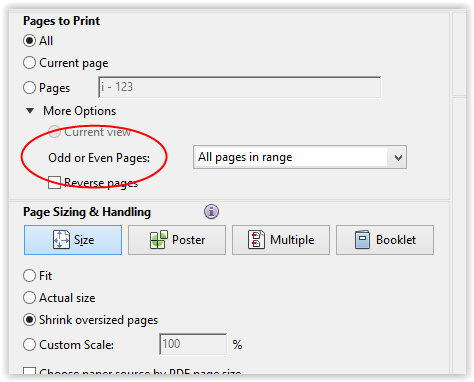
How to print odd or even numbers only in a printer
| printing odd/even pages in Opera Browser |
My quick answer :
I used Opera browser. It has the setting to do this
Further comment :
Maybe other browsers have the odd/even option when printing pages but I couldn't find them. I have not checked Internet Explorer
Subscribe to:
Posts (Atom)